HPE cx555a 100G 网卡刷入以太网固件指北
参考文献
原理
简而言之,HPE 版本的 cx555a 网卡固件有锁,自带的 HPE 固件不支持以太网模式,只支持 IB 模式,并且只能刷入 HPE 签名的固件而不能刷入 Mellanox 原版固件。但是 cx555a 硬件上和双口的 cx556a 是一样的,HPE 的 cx555a 卡可以刷入 HPE 版本的 cx556a 固件,而 HPE 版本的 cx556a 固件是支持以太网模式的。刷入 cx556a 固件后,系统内识别出两个 100G 网口,但只有一个口在硬件上存在,另一个口没有焊接元件。
操作流程
本例使用超威 H12SSL-i 主板和 Ubuntu 22.04 系统,内核版本
1 | $ uname -r |
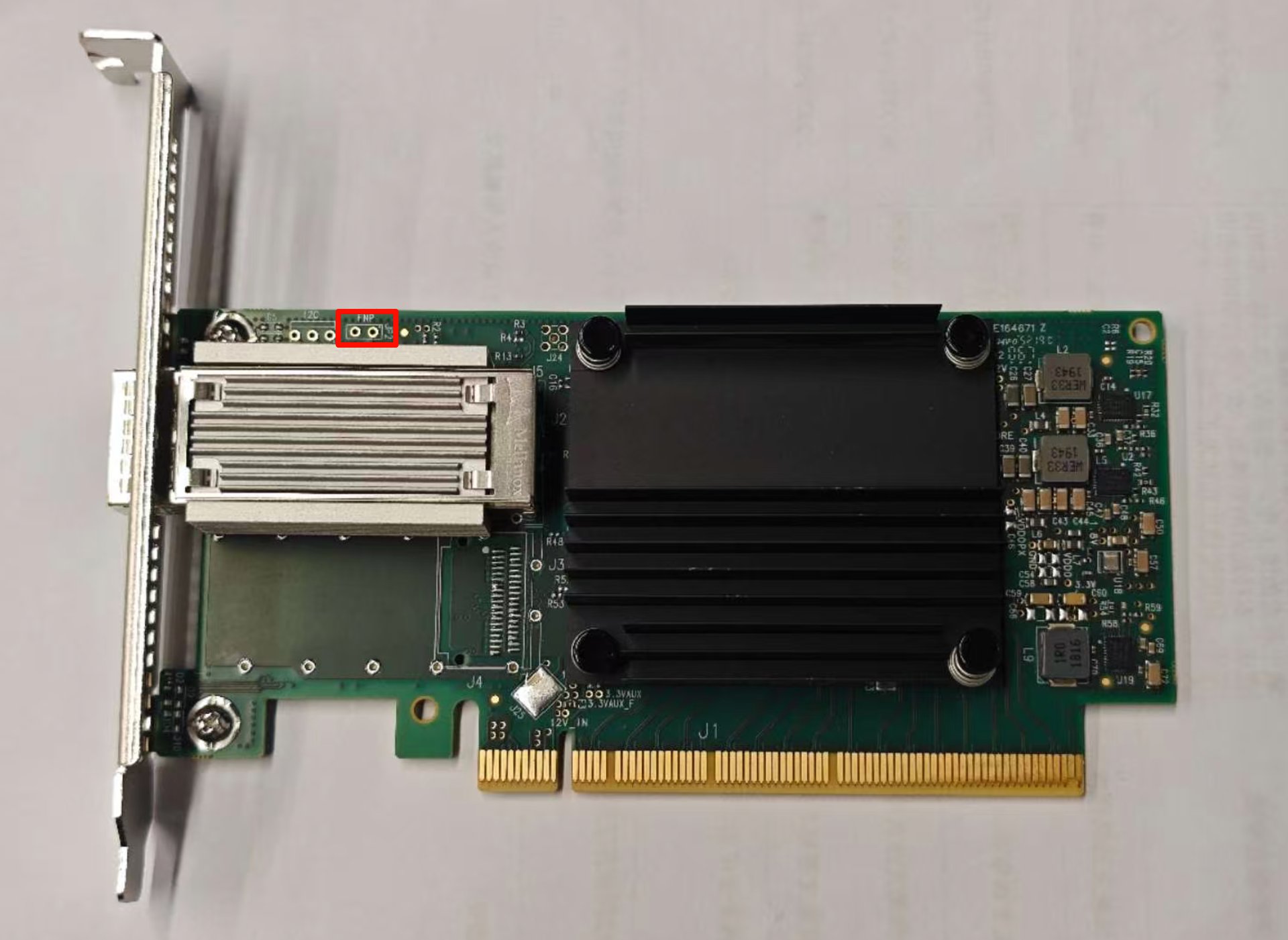
- 用订书钉或者回形针把红框内
FNP/JP2焊点短接,进入固件恢复模式 - 装机并上电,此时网口旁边会有黄色 LED 常亮,表示进入固件恢复模式
- 此时运行
lspci命令,可以看见ConnectX-5 Flash Recovery设备1
2$ lspci | grep Mellanox
81:00.0 Memory controller: Mellanox Technologies MT28800 Family [ConnectX-5 Flash Recovery] - 下载并安装 Mellanox 官方最新版 MFT 工具
1
2
3
4
5
6
7# 下载 MFT 工具
wget https://www.mellanox.com/downloads/MFT/mft-4.34.0-145-x86_64-deb.tgz
# 解压
tar -xzf mft-4.34.0-145-x86_64-deb.tgz
# 安装
cd mft-4.34.0-145-x86_64-deb
sudo bash install.sh - 此时应该可以通过
mst命令看到设备1
2
3
4
5
6
7
8
9
10
11
12
13
14
15
16
17$ sudo mst start
Starting MST (Mellanox Software Tools) driver set
Loading MST PCI module - Success
Loading MST PCI configuration module - Success
Create devices
Unloading MST PCI module (unused) - Success
$ sudo mst status
MST modules:
------------
MST PCI module is not loaded
MST PCI configuration module loaded
MST devices:
------------
/dev/mst/mt525_pciconf0 - PCI configuration cycles access.
domain:bus:dev.fn=0000:81:00.0 addr.reg=88 data.reg=92 cr_bar.gw_offset=-1
Chip revision is: 00 - 下载并解压最新 HPE 版本的 cx556a 固件
1
2curl -fL -o "fw-ConnectX5-rel-16_35_4030-872726-B21_Ax_Bx-UEFI-14.29.15-FlexBoot-3.6.902.tar.gz" https://downloads.hpe.com/pub/softlib2/software1/pubsw-linux/p1133476375/v253748/fw-ConnectX5-rel-16_35_4030-872726-B21_Ax_Bx-UEFI-14.29.15-FlexBoot-3.6.902.tar.gz
tar -xzf fw-ConnectX5-rel-16_35_4030-872726-B21_Ax_Bx-UEFI-14.29.15-FlexBoot-3.6.902.tar.gz - 使用 MFT 工具刷入固件,设备路径参考上面
mst status命令的输出确认修改 PSID:1
sudo flint -d /dev/mst/mt525_pciconf0 -i fw-ConnectX5-rel-16_35_4030-872726-B21_Ax_Bx-UEFI-14.29.15-FlexBoot-3.6.902.signed.bin -allow_psid_change burn
刷入固件大约需要一分钟时间。1
2
3
4
5
6
7
8
9
10
11
12
13
14
15
16Done.
Current FW version on flash: 16.30.1004
New FW version: 16.35.4030
You are about to replace current PSID on flash - "HPE0000000008" with a different PSID - "HPE0000000009".
Note: It is highly recommended not to change the PSID.
Do you want to continue ? (y/n) [n] : y
Burning FW image without signatures - OK
Burning FW image without signatures - OK
-W- Failed to update FW boot address. Power cycle the device in order to load the new FW.
Restoring signature - OK
-I- To load new FW, issue system-level reset. - 刷入完成后,断电 (否则不会退出固件恢复模式),取下短接焊点,重新上电开机
- 此时
lspci命令可以看到两个 IB 设备使用1
2
3$ lspci | grep "Mellanox"
81:00.0 Infiniband controller: Mellanox Technologies MT27800 Family [ConnectX-5]
81:00.1 Infiniband controller: Mellanox Technologies MT27800 Family [ConnectX-5]mlxconfig把第一个口改成以太网模式,第二个口物理上不存在,保持 IB 模式即可1
sudo mlxconfig -d 0000:81:00.0 set LINK_TYPE_P1=2
LINK_TYPE_P1=2表示以太网模式,LINK_TYPE_P1=1表示 IB 模式。 - 重启后,第一个口变成以太网口,使用
ip a命令可以看到它也可以使用1
2
3$ ip a
5: enp129s0f0np0: <NO-CARRIER,BROADCAST,MULTICAST,UP> mtu 1500 qdisc mq state DOWN group default qlen 1000
link/ether 94:40:c9:xx:xx:xx brd ff:ff:ff:ff:ff:ffethtool命令查看网口信息1
2
3
4
5
6
7
8
9
10
11
12
13
14
15
16
17
18
19
20
21
22
23
24
25
26
27
28
29
30
31
32
33
34
35
36
37
38
39
40
41
42
43
44
45
46
47
48$ sudo ethtool enp129s0f0np0
Settings for enp129s0f0np0:
Supported ports: [ ]
Supported link modes: 1000baseKX/Full
10000baseKR/Full
40000baseKR4/Full
40000baseCR4/Full
40000baseSR4/Full
40000baseLR4/Full
25000baseCR/Full
25000baseKR/Full
25000baseSR/Full
50000baseCR2/Full
50000baseKR2/Full
100000baseKR4/Full
100000baseSR4/Full
100000baseCR4/Full
100000baseLR4_ER4/Full
Supported pause frame use: Symmetric
Supports auto-negotiation: Yes
Supported FEC modes: None RS BASER
Advertised link modes: 1000baseKX/Full
10000baseKR/Full
40000baseKR4/Full
40000baseCR4/Full
40000baseSR4/Full
40000baseLR4/Full
25000baseCR/Full
25000baseKR/Full
25000baseSR/Full
50000baseCR2/Full
50000baseKR2/Full
100000baseKR4/Full
100000baseSR4/Full
100000baseCR4/Full
100000baseLR4_ER4/Full
Advertised pause frame use: Symmetric
Advertised auto-negotiation: Yes
Advertised FEC modes: Not reported
Speed: Unknown!
Duplex: Unknown! (255)
Auto-negotiation: on
Port: Other
PHYAD: 0
Transceiver: internal
Supports Wake-on: d
Wake-on: d
Link detected: no (No cable)